Monitore a atividade da sua marca nas redes sociais: as 10 melhores ferramentas para analisar o Twitter
O monitoramento da marca é essencial no mundo digital de hoje, dominado por conversas e interações online. Para gerir a reputação de uma marca de forma eficiente, é preciso saber o que as pessoas estão falando sobre sua marca nas mídias sociais e ser capaz de reagir em tempo hábil aos comentários dos usuários, principalmente os negativos — o que requer ferramentas para analisar redes sociais como o Twitter, para citar um dos mais populares, onde a informação flui em alta velocidade.
Here's a number that should make you uncomfortable: roughly 500 million posts go up on X every single day. Half a billion. And somewhere in that flood, someone's talking about your brand — complaining about your checkout flow, recommending your product to a friend, comparing you unfavorably to a competitor. The question isn't whether these conversations exist. They do. The question is whether you're seeing them.
That's the whole pitch for Twitter monitoring tools, and honestly, it's a good one. The right social media monitoring tool lets you track brand mentions (even the ones that don't tag you), run sentiment analysis on what people actually think, pull actionable insights out of chaos, and respond to customer feedback before it spirals. Whether you're a social media manager babysitting six accounts or a marketing team trying to figure out why your last social media campaigns flopped, this stuff matters for your social media marketing.
But — and this is where most "best tools" articles get lazy — not all Twitter monitoring tools do the same thing. Some are basically glorified keyword alerts. Others give you deep analytics, lead generation, visual content recognition, the works. I've spent time with ten of them this year. Here's what's actually worth your money and attention, starting with why you should care about monitoring Twitter in the first place.
Why monitoring Twitter matters for your brand
X still has around 557 million monthly active users. It's loud, it's messy, and it's one of the few social media platforms where conversations happen entirely in public. People don't DM their complaints about your product — they post them. They quote-tweet your competitor's launch and say "this is what [your brand] should've done." They share screenshots of bad customer service interactions and those things get 10,000 impressions before lunch.
If you're not monitoring Twitter activity, you're flying blind — and your brand's reputation is at the mercy of whatever's trending. It's that simple.
Brand monitoring and reputation management
Tracking Twitter mentions tells you how people actually talk about your company — not how you think they do, not how your brand guidelines say they should. You see which content gets real audience engagement, what time your followers are most active, and which topics spark the kind of conversation that moves the needle. This is the foundation of any social media strategy that isn't based on vibes. When you track brand mentions consistently, you start building a positive brand image through responsiveness rather than just pushing content into the void.
Here's something most brands underestimate: research from Octolens found that 91% of social media posts about brands don't tag the company handle. Ninety-one percent. That means if you're only watching your notifications tab, you're missing almost everything. A decent social media monitoring tool catches untagged social media mentions too — which is kind of the whole point.
Using customer feedback to prevent a crisis
Negative customer feedback on Twitter has a particular velocity to it. One complaint gets amplified by retweets, quote posts, screenshot shares. Within hours, something that started as a single frustrated customer can become a story. Social listening catches those early signals — the grumbling, the product complaints, the service failures — before they snowball.
The brands that handle crises well? They're not the ones that never screw up. They're the ones whose monitoring tools flagged the conversation while it was still small. Instant alerts mean your team can jump in and actually fix things while people are still paying attention. According to SocialBee, a company's public reputation can account for as much as 63% of its market value — so the stakes aren't theoretical. YouScan has a solid breakdown of how major brands have handled reputation crisis management if you want to see what good (and bad) responses look like in practice.
Competitive analysis and industry trends
This is the part people sleep on. Twitter monitoring isn't just about your brand — it's maybe even more useful for watching everyone else. Track mentions of competitors, follow specific keywords tied to your industry, spot emerging trends and industry trends before they hit the mainstream. That kind of competitive analysis feeds directly into smarter marketing strategies. It's why monitoring Twitter has become standard for any social media marketing team that takes their job seriously.
Real example: you notice a competitor catching heat on X for a buggy product launch. That's your window. Jump into relevant conversations, adjust your own messaging, or just... take notes. Social listening vs. monitoring are technically different things, but either way, you're getting competitive intelligence that your rivals wish you didn't have.
What to look for in Twitter monitoring tools
Before you start evaluating X monitoring tools and Twitter monitoring tools, here's what actually separates the useful ones from the ones that just look good in a demo:
Real time alerts. Non-negotiable. If a conversation around your brand is blowing up and you find out the next morning from your boss's Slack message, something has gone wrong. The best monitoring tools push instant alerts — email, Slack, in-app — so you can respond while the conversation is still happening.
Then there's sentiment analysis. Counting mentions is fine, but it doesn't tell you whether people love you or are furious with you. Modern sentiment analysis tools use AI to classify tone in online conversations — including sarcasm and slang — giving you a deeper understanding of how your audience feels. Big difference between "this product is sick" (positive) and "I'm sick of this product" (very much not).
Historical data matters more than people think. Sure, tracking real time conversations is great for putting out fires. But if you want to spot patterns — seasonal spikes, recurring complaints, slow shifts in public opinion — you need to analyze data over months. Any serious analytics tool gives you access to this. It's the difference between data driven decisions and just reacting to whatever's loudest today.
And don't forget the boring practical stuff. Does the tool integrate with other social media channels? Can you schedule posts from the same place? Is there a free plan or at least a trial before you commit to paid plans? A good listening tool should fit into how you already work. These details matter more than any feature list suggests — and they're the difference between a twitter x monitoring tool you actually use and one that collects dust.
10 best Twitter monitoring tools worth trying in 2026
Alright, here's the actual list. I've tried to be honest about what each tool does well and where it falls short — not every tool is right for every team, and the ones that claim to be are usually lying. What matters is whether the monitoring capabilities match your actual workflow, and whether it surfaces relevant conversations without burying you in noise.
1. YouScan — visual insights, sentiment analysis, and lead generation
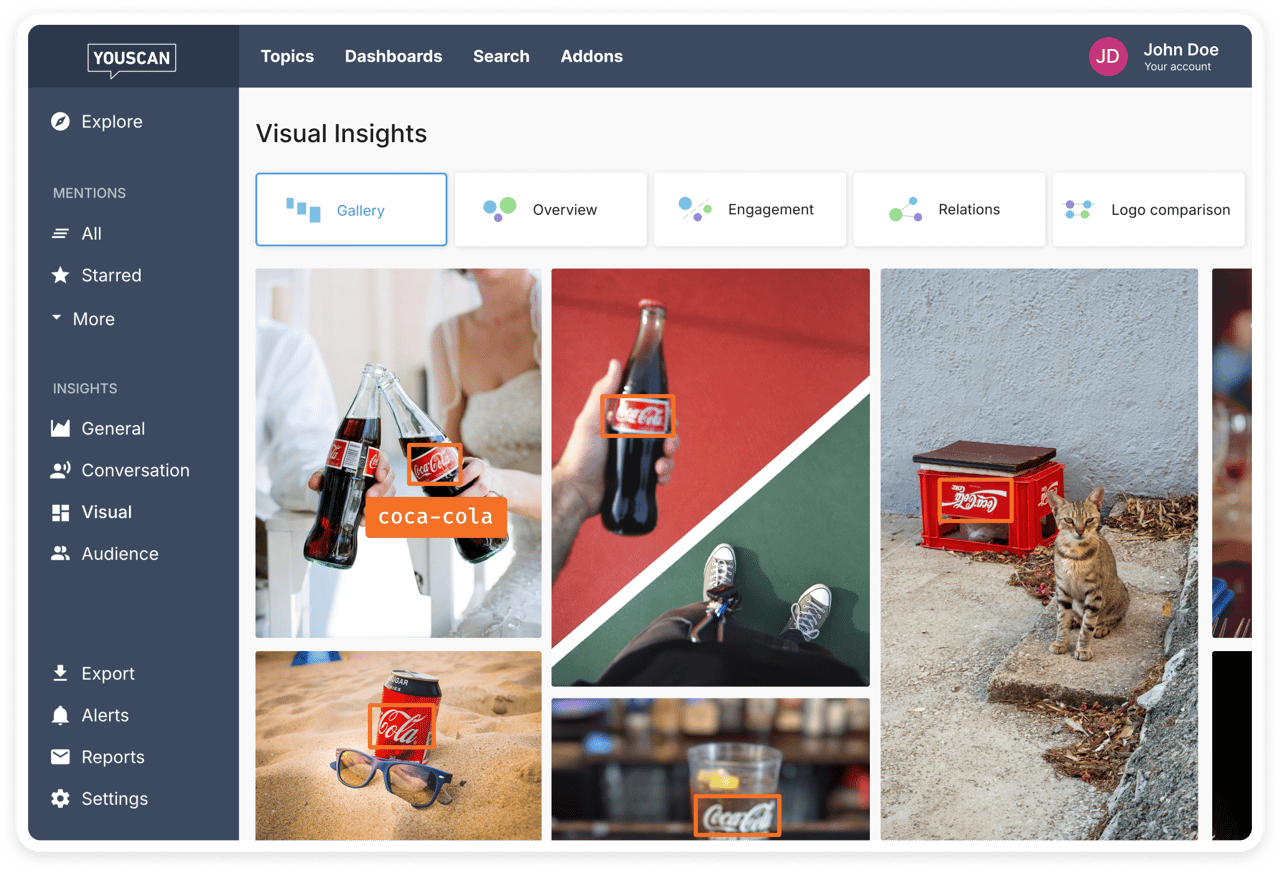
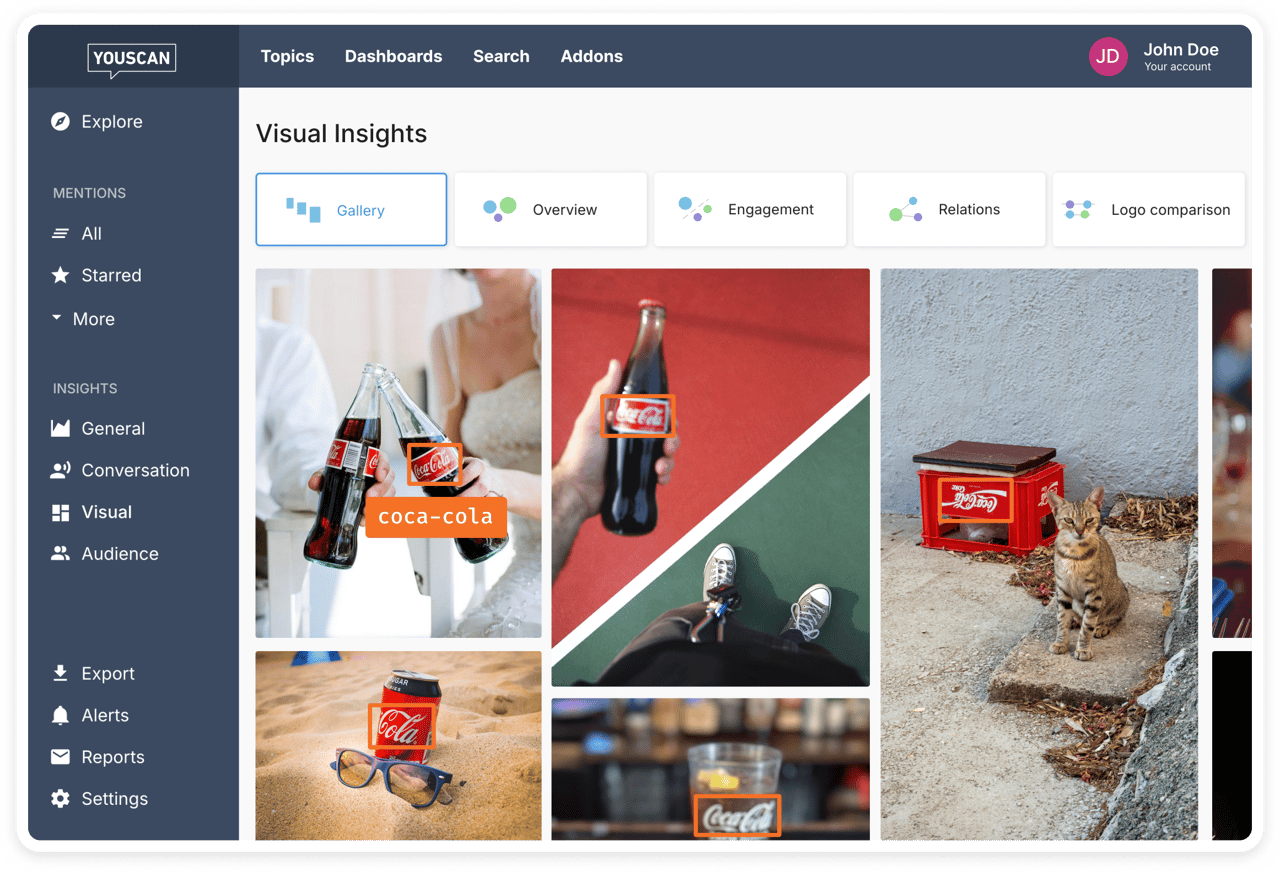
Full disclosure: this article lives on the YouScan blog, so take that context however you want. That said, there's a reason YouScan tops this list, and it's not just brand loyalty — it's the visual insights feature, which is genuinely different from anything else on this list.
Most Twitter monitoring tools only catch text. YouScan's AI-powered social listening also detects your brand logo in images posted across social media platforms — photos where nobody tagged you or even mentioned your name. Someone posts a picture wearing your product at a concert? YouScan catches it. That's a layer of brand monitoring that text-only tools physically can't do, and it means you're seeing mentions that competitors using other tools are completely missing.
On the text side, it does what you'd expect — tracks Twitter mentions, monitors relevant keywords and hashtags, provides solid brand sentiment analysis across public social media posts. But the Word of Mouth feature is where it gets interesting. It isolates posts where users share personal experiences, compare products, complain, recommend, or ask questions — the kind of customer feedback that marketing teams actually learn from.
YouScan also does lead generation and influencer identification. Audience insights show you demographics, interests, and occupations of people mentioning your brand. You can combine that with target audience analysis to figure out not just who's talking, but who you should be talking to. Geography, language, and source filters let you narrow down to what actually matters for your specific market.
Check out the full feature set on the YouScan product page. And if you keep bumping into social listening jargon, the social listening glossary is surprisingly useful.
2. Sprout Social — best for enterprise-level social listening
Sprout Social is the tool that big teams with big budgets tend to land on, and for good reason. The Query Builder lets you set up detailed searches with just a few clicks — brand mentions, industry keywords, relevant hashtags across X and other social media platforms. Their Listening Spike Alerts are particularly clever: the second conversation volume around your brand jumps unexpectedly, your team knows about it. That covers both crisis management and those rare positive viral moments worth amplifying.
Sentiment analysis, competitive insights, Twitter analytics, presentation-ready reports — it's all there. For monitoring conversations at scale, Sprout delivers actionable insights that help you make informed decisions fast.
But here's the thing: it's expensive. Like, really expensive. This is an enterprise-grade paid tool and the pricing reflects it. If you're a team of three, it's probably overkill. For mid-to-large organizations that need a full social media management suite with serious monitoring capabilities, though, it's hard to argue against.
3. Brand24 — best for tracking brand mentions across the web
Brand24 casts a wider net than most. It monitors brand mentions across social media channels, news sites, blogs, forums, podcasts — not just Twitter. The real-time dashboard shows every mention as it happens, with sentiment analysis baked in. For a head-to-head comparison, we have a detailed YouScan vs Brand24 breakdown that's worth reading.
The feature I keep coming back to is their discussion volume chart. You can see exactly when your brand generates the most online conversations, then correlate those spikes with campaigns, launches, or external events. Share of voice tracking against competitors is genuinely useful too — it's one of those metrics that sounds like a vanity stat until you actually use it to make decisions.
Paid plans start under $100/month with detailed analytics included, and there's a free trial. Accessible enough for small teams that still want professional-grade social listening.
4. Hootsuite — best for managing social media and monitoring in one place
Everyone knows Hootsuite. It's the Swiss Army knife that does everything okay and a few things really well. You can schedule posts, track Twitter mentions, monitor relevant conversations by keyword or hashtag, and manage multiple social media channels from one dashboard. Social media managers juggling several accounts tend to love it because the centralized workflow is a genuine time-saver.
Customizable streams let you organize brand mentions, industry keywords, and competitor tracking into tabs. Assign incoming mentions to specific team members — great for handling customer queries. Hootsuite also ties into X Ads, so you can connect paid and organic social media campaigns and extract valuable insights from both.
Pricing starts at $99/month after a trial. The steep learning curve is real — the first week feels like learning a new CRM. But once you've got it set up, the all-in-one social media management approach saves time.
5. Mention — best for monitoring Twitter alongside news sites and blogs
Mention is the tool you pick when you need to know what's being said about your brand everywhere — not just on X. It tracks brand mentions across Twitter, other social networks, news sites, blogs, and forums. Full-scale media monitoring.
Real time alerts, sentiment analysis, competitive analysis — the standard toolkit. But where Mention earns its keep is in helping you track specific keywords and hashtags to gain valuable insights into what your target audience discusses before you create content. It's strong at monitoring conversations across platforms and catching mentions that would otherwise slip through. Reports are clean and client-ready, which matters if you're an agency.
Solo plan starts at $49/month. Solid middle ground for mid-sized businesses that want broad social media monitoring without paying enterprise prices.
6. Brandwatch — best for data-heavy brand monitoring
Brandwatch is the tool for teams who think in spreadsheets. It's an all-in-one social media management and monitoring platform with particularly strong crisis management features — real time alerts for unusual activity or emerging reputation threats on X and other social media platforms, notifications pushed to your whole team and stakeholders simultaneously. If you're weighing options, we have a Brandwatch alternatives article that lays out the differences clearly.
Where Brandwatch really earns its price tag is depth. Analyze data across massive volumes of social media posts, track emerging trends, segment by topic or sentiment, and access historical data going back years. For large organizations that need to monitor Twitter at scale and make informed decisions from detailed analytics, there aren't many tools that match it.
The trade-off is complexity and cost. This is an enterprise paid tool, full stop. Smaller teams will find it's more firepower than they need — and the invoice will remind them.
7. Keyhole — best for campaign-level Twitter analytics
If you're running specific social media campaigns and need to know exactly what's working, Keyhole is built for that. It pulls detailed Twitter analytics on engagement, impressions, and contributor performance using X's firehose API — real data points, not estimates. It's a valuable analytics tool for teams focused on twitter marketing and campaign ROI.
You can also monitor public profiles without login access (useful for competitive analysis and influencer scouting). Custom campaign-based pricing means you pay for the scope you actually need. No bloated annual contracts for features you'll never touch.
8. Awario — best for Boolean search and free social search
Awario is for the people who actually want control over their monitoring queries. The free social search approach lets you use Boolean search to combine terms, exclude noise, and zero in on exactly the conversations that matter. If you've ever been frustrated by a tool returning hundreds of irrelevant mentions, Awario fixes that.
It also saves historical data and catches untagged brand mentions — both critical for accurate brand monitoring. The analytics dashboard covers mention growth, sentiment, share of voice, and geographic spread of your online conversations. Less flashy than the enterprise tools, but more accessible in terms of price and complexity. Sometimes that's exactly what you need.
9. Zoho Social — monitor twitter activity with built-in CRM
If your company already runs on Zoho's ecosystem, this is a no-brainer. Zoho Social connects social media monitoring, publishing, and analytics directly to your CRM. Track keywords, monitor Twitter mentions, schedule posts — all from one dashboard that feeds audience insights from social channels straight into your customer data.
The real-time monitoring streams show how users engage with your tweets. You can identify influential users for collaboration, and because the CRM integration is native, you're connecting social media marketing with sales and lead generation in a way that standalone tools simply can't. You can also monitor twitter activity across multiple accounts and use the data to refine your target audience targeting.
10. Twilert — best for email-based Twitter monitoring and Google Alerts alternative
If you've ever wished Google Alerts actually worked for Twitter, Twilert is basically that. It sends email digests of relevant tweets — keywords, mentions, hashtags — on whatever frequency you choose. Hourly, daily, weekly. No dashboard to check, no app to learn.
What I like about Twilert is the sentiment filtering. You can get alerts for only negative, positive, or verified tweets. That means you're not sifting through hundreds of irrelevant mentions every morning. Boolean operators and geo-targeting round it out. For teams that want a lightweight, low-friction way to monitor Twitter without committing to a full social media monitoring tool, Twilert is the simplest option on this list.
How to choose the right monitoring tool for your team
This comes down to three things: what you actually need to track, how big your team is, and how much you're willing to spend. That's it.
If you're mostly trying to keep an eye on conversations about your brand on X and respond quickly to customer queries, something focused like Twilert or Awario will probably do the job. But if you need to monitor Twitter alongside other social media platforms and tie that data into broader marketing strategies, you're looking at Sprout Social, Hootsuite, or YouScan — tools with social listening dashboards that pull everything into one view. Don't try running multiple x monitoring tools at once. Pick one that fits and commit to it. For a wider comparison, the social listening tools roundup covers even more options.
Budget matters. Some tools offer a free plan or trial period — use them. Others, like Brandwatch and Sprout, are clearly built for enterprise teams with bigger budgets. The short answer? Start with the problem you're solving — brand monitoring, competitive analysis, customer feedback, or lead generation — and pick accordingly. You can compare YouScan pricing to get a sense of where it fits.
And if your brand wants to go beyond X — track visual mentions, cover additional sources — platforms like YouScan support Moltbook monitoring alongside other social media channels. If you're currently on Meltwater and wondering about alternatives, YouScan's Meltwater competitors comparison is worth a look.
Tips for getting the most from Twitter monitoring
Having the tool is step one. Using it well is a different thing entirely.
Don't just track your brand name. Set up monitoring for product names, common misspellings (people will butcher your brand, accept it), competitor names, and relevant keywords tied to your industry. YouScan's guide to
competitor research with social listening shows how to set this up without drowning in noise — because that's the risk. Too many generic terms and your dashboard becomes useless.
Prioritize your alerts. Set high-priority real time alerts for negative sentiment spikes and customer complaints. Let general brand mentions sit at a lower priority you review daily or weekly. This keeps your marketing team focused on what actually needs a response, not just what's newest.
Use your monitoring data to create content. When the same questions, complaints, or topics keep showing up in your Twitter mentions, that's your content calendar writing itself. Social media listening doesn't just protect your brand — it tells you exactly what to create content about. Track which topics drive the most audience engagement and build your social media strategy around real audience insights instead of whatever your team brainstormed in a meeting three months ago. The best monitoring tools help you track mentions and turn raw conversations into a content pipeline.
And review your setup every quarter. Industry trends shift. Competitors appear and disappear. Your own product changes. Update your tracked keywords and specific keywords so you're still capturing the conversations that affect your brand's performance.
Start tracking what matters on X
The gap between brands that stay ahead of problems and brands that spend all their time reacting to them? It's usually monitoring. That's it. The right Twitter monitoring tools give you valuable insights from public social media posts, let you track mentions before they become crises, spot competitive insights your rivals would prefer you didn't have, and make data driven decisions based on what your target audience actually says. Good monitor twitter mentions habits lead to informed decisions across your entire marketing team.
Every tool on this list does something differently. Pick the one that matches your actual goals (not the one with the prettiest demo), test it properly, and bake monitoring into your regular social media marketing workflow.
Your audience is already talking. Tracking conversations is the easy part — the hard part is doing something useful with what you find. Might be worth listening.
If you want to start with a tool that combines social media listening, visual insights, and sentiment analysis in one platform, give YouScan a try.
FAQ
What is a Twitter monitoring tool?
A Twitter monitoring tool tracks and analyzes mentions, keywords, and hashtags related to your brand across X. It lets you see what people are saying — including the posts that don't tag you — so you can respond to customer feedback, spot trends, and protect your brand's reputation without manually scrolling through half a billion daily posts.
What's the difference between Twitter monitoring and social listening?
Monitoring is tactical — it tracks specific keywords, brand mentions, and competitor names on X with real-time alerts so you can act fast. Social listening is strategic — it analyzes broader conversations across multiple platforms over time to surface trends, sentiment shifts, and deeper audience insights. Most teams need both.
Can Twitter monitoring tools catch mentions that don't tag my brand?
Yes, and this matters more than most brands realize. Research suggests the vast majority of social media posts about brands don't actually tag the company handle. Good monitoring tools catch those untagged mentions through keyword tracking, and some — like YouScan — also detect your brand logo in images where nobody mentioned you by name at all.
How do I choose the right Twitter monitoring tool?
Start with the problem you're solving. If you just need alerts on brand mentions, a lightweight tool like Twilert or Awario works. If you need sentiment analysis, competitive insights, and cross-platform coverage tied into a broader marketing strategy, look at tools like YouScan, Sprout Social, or Brandwatch. Budget, team size, and integration needs should narrow it from there.